

Download Local Cooling – power optimization, energy saving, eco-friendly computing, computer efficiency, green technology
Overview
Local Cooling is a productivity-focused utility designed to help users reduce their computer’s energy consumption through intelligent power management. The app targets individuals and organizations seeking to adopt more sustainable computing habits by minimizing unnecessary power usage. Its core purpose is to enable users to monitor and control energy-hungry components such as monitors, disk drives, and system hibernation states. By automating the shutdown of idle devices and offering customizable power-saving configurations, Local Cooling supports a more environmentally conscious approach to digital work and personal computing.
Target users include eco-conscious individuals, remote workers, IT professionals, and educators who prioritize energy efficiency. The app is particularly relevant in today’s climate-aware digital landscape, where reducing carbon footprints from electronic devices is increasingly important. While the developer, Jason A. Bilbrey, is credited with its creation, no additional background information is available regarding their prior work or technical expertise. The app was released on April 17, 2024, and is available for free on the Windows platform.
Real-world applications include reducing electricity costs in home offices, extending hardware lifespan by minimizing idle operation, and supporting institutional sustainability goals. In the broader app ecosystem, Local Cooling fills a niche in green technology tools, offering a lightweight, focused solution for users who want to contribute to environmental conservation without complex setup or system overhead.
Key Features & Functionality
- Intelligent Output Cutting Plan: Automatically disables active monitors, disk drives, and triggers hibernation after a user-defined idle period. This reduces continuous power draw from components that are not in use.
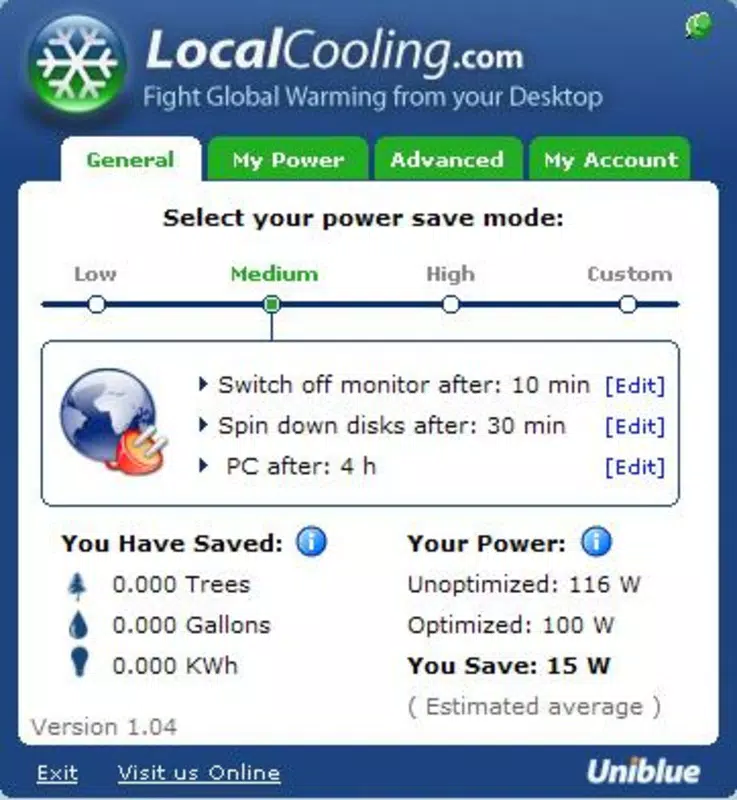
- Customizable Power Savings Modes: Users can select from preset energy-saving profiles or create personalized plans tailored to their workflow, balancing performance and efficiency.
- Innovative Energy Savings Panel: Translates energy savings into relatable environmental metrics—such as trees saved, gallons of water conserved, and kilowatt-hours reduced—helping users visualize their ecological impact.
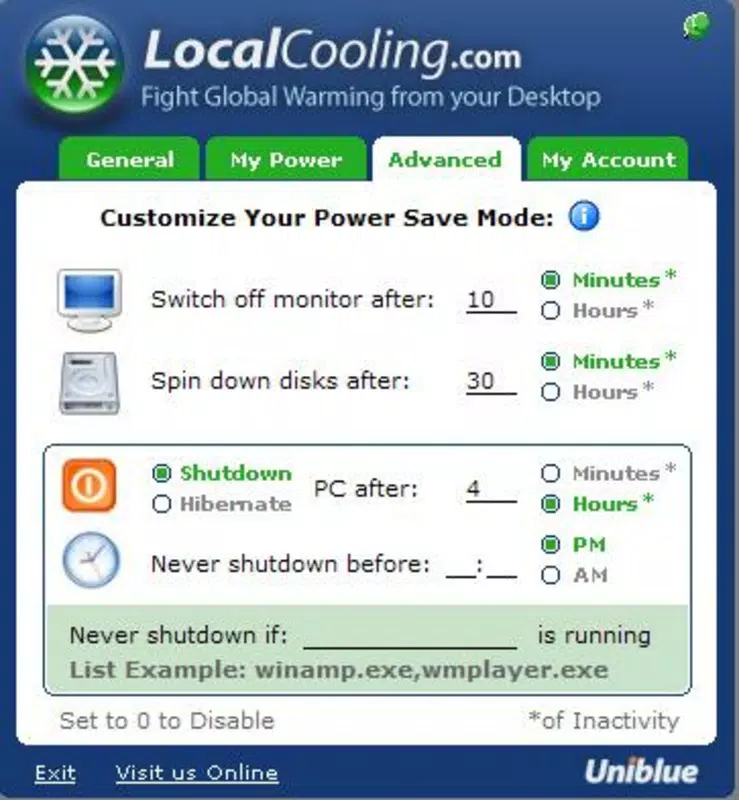
- Editable Monitor and Hard Disk Controls: Provides granular control over display and storage device power states, with advanced logic like “Never Shutdown If Program is Running” to prevent disruptions during critical tasks.
- My Power Tab – Energy-Eating Offenders: Identifies the top power-consuming processes and devices in real time, allowing users to address inefficiencies proactively.
For example, a remote worker using Local Cooling can set their monitor to turn off after 5 minutes of inactivity, reducing daily energy use. The energy savings panel then displays this as equivalent to saving 0.3 trees annually, reinforcing positive behavior. Similarly, a university lab administrator might use the “My Power” tab to detect a background process consuming excessive power and disable it, improving overall system efficiency.
Interface, UX & Performance
The interface of Local Cooling is described as compact and user-friendly, featuring a streamlined display panel that presents essential power management data at a glance. The visual layout emphasizes clarity and accessibility, with intuitive controls for adjusting power settings and viewing energy impact metrics. Navigation appears to be straightforward, relying on tab-based access to core functions such as power plans, energy savings tracking, and system monitoring.
Although the developer did not list formal performance metrics, the app’s lightweight footprint of 4.8 MB suggests minimal system resource usage. It is designed to operate efficiently in the background without significantly impacting CPU or memory performance. Users can expect consistent responsiveness across a range of Windows devices, including laptops, desktops, and older systems, though specific compatibility details were not disclosed.
Stability is implied by the app’s focused functionality and absence of reported issues. The absence of complex animations or resource-intensive graphics supports smooth operation. However, detailed information about crash rates, update frequency, or long-term performance under heavy use was not provided by the developer.
Platform Compatibility & Technical Requirements
Local Cooling is designed exclusively for the Windows operating system. The app is compatible with Windows platforms, though specific OS versions were not listed. The software version is 1.0.0, and the file size is 4.8 MB, indicating a lightweight, efficient installation.
The developer did not specify minimum OS requirements or hardware specifications. As such, users should verify compatibility with their device’s current Windows configuration. No additional dependencies or runtime environments were mentioned. The app is available for free, with no in-app purchases or subscription models currently in place.
Pros and Cons
- Lightweight design (4.8 MB) with minimal system impact
- Free to download and use with no hidden costs
- Provides visual feedback on environmental impact through relatable metrics
- Offers granular control over monitor, disk, and hibernation settings
- Includes a feature to identify and target high-energy-consuming processes
- Specific OS compatibility details were not disclosed
- No information on update frequency or long-term maintenance
- Limited to Windows platform; no support for macOS or Linux
- Developer background and support channels are not publicly available
- Advanced features may require some technical understanding to configure effectively
FAQ
Is Local Cooling safe to install on my computer?
Yes, the app is designed to operate safely within the Windows environment. It does not modify core system files or install third-party software. However, users should ensure they download the app from trusted sources.
Can I use Local Cooling on older Windows systems?
The developer did not specify minimum OS requirements. While the lightweight size suggests compatibility with older systems, users should verify functionality on their specific device.
Does Local Cooling require an internet connection?
Based on available information, the app does not appear to require an active internet connection to function. All core features operate locally on the device.
How often does Local Cooling update?
Update frequency was not disclosed by the developer. Users should monitor the official source for new releases.
Is Local Cooling available for Android or iOS?
Currently, Local Cooling is only available for Windows. There is no public information indicating plans for mobile platform support.
Final Thoughts
Local Cooling delivers a focused, effective solution for users committed to reducing their digital carbon footprint. Its intelligent automation, customizable settings, and environmental impact visualization make it a valuable tool for anyone seeking to improve computer efficiency and promote sustainable computing habits. While it lacks broad platform support and detailed technical documentation, its simplicity, low resource usage, and free access enhance its appeal.
Those who prioritize energy conservation, whether for personal, educational, or professional reasons, will find significant value in this utility. It bridges the gap between environmental responsibility and practical technology use, offering a tangible way to contribute to green initiatives through everyday computing.
Download Local Cooling now


